People say "lead scanner" for two different things. Some mean the small rental device handed out by the organizer, others mean a lead scanning tool that runs on the phone already in their pocket. Both are fine. Both do the same job in the end, which is to turn a five-minute conversation at your stand into a contact you can follow up.
This page is about the second kind. It explains what a good lead scanner app has to handle on the show floor, how ScanLead does it, and where a rented device still makes sense.
What a lead scanner app has to scan
A visitor rarely arrives with the format you expect. One has a badge with a QR code, the next one hands you a business card, and the third has neither because he left his card case in the car. A lead scanning app has to cope with all three without slowing you down.
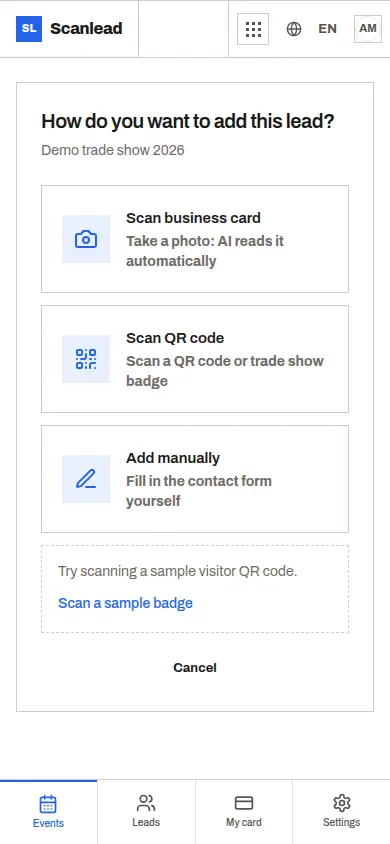
ScanLead reads badge QR codes that contain a vCard, a MeCard or a JSON contact, and fills in the form for you. If the code holds a LinkedIn profile link, it takes the name from it. A photographed business card is read automatically, in Latin, Greek, Cyrillic, Chinese, Japanese and Korean scripts, and you check the name, company, job title, email and phone before saving. When there is nothing to scan, a short manual entry takes less than a minute.
More detail on each method lives in Badge scanner app and Business card scanner for trade shows.
Scanning is only half of lead capture
A scan is not enough. A scanned badge gives you a name and an email. It does not tell you that this visitor runs three sites and wants a quote before March. That part only exists in your head for the next ten minutes, so the app has to let you write it down straight away.
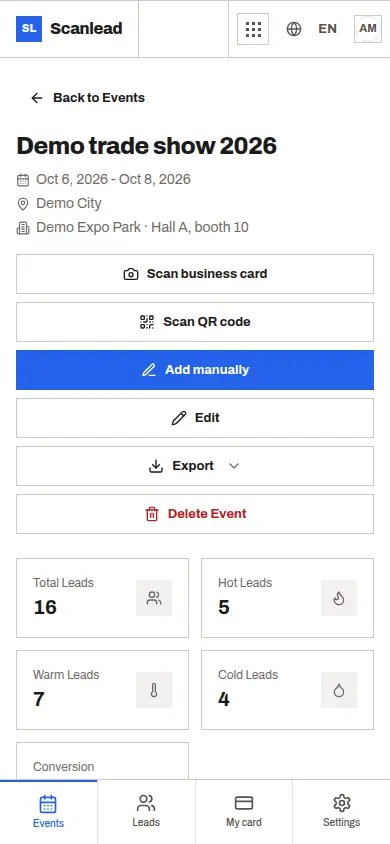
In ScanLead you mark every lead hot, warm or cold and add a note. Each lead belongs to an event, with its name, dates, city, venue and stand, so the 120 contacts of a three-day show never mix with the next one. The event page then shows how many hot, warm and cold leads you collected, and you can compare your shows to see which one was worth the stand.
App or rented lead scanner device
A rented device from the organizer has one real advantage, which is that it reads every badge at the show, including those that only carry an ID number linked to the registration database. A phone app cannot do that, because the contact data is simply not in the code.
The app wins the rest. You keep the same tool from one show to the next, every colleague scans with their own phone, nothing has to be ordered before a deadline, and the leads stay in your account after the show closes. If your main show uses number-only badges, nothing stops you from renting there and using ScanLead at the others. The trade-offs are laid out in Alternative to the organizer's badge scanner.
When the hall network gives up
Halls are hard on mobile data. Open ScanLead while you still have a connection. If the network drops afterwards, badge QR scanning and manual entry keep working, the contact is kept on the phone and it syncs once the connection is back. Reading a business card photo is the one method that needs a connection. We explain the details in Offline badge scanning.
From the scanner to your follow-up
At the end of the day, export the show to a CSV or Excel file, with status, notes, the person who added each lead and the date. If you follow up from a CRM, CRMlead receives the contacts automatically with the same Lead account, and the REST API with signed webhooks connects ScanLead to Make or Zapier for other tools.
ScanLead is free, with every feature included, no credit card and no limit on scans or team members. That makes it a fair choice for a freelancer with one stand a year as much as for a sales team that exhibits every month. For a broader look at the category, read Lead retrieval app for trade shows.
Frequently asked questions
What is a lead scanner?
It is a device or an app that captures a visitor's details at a trade show, usually by scanning the badge or the business card, so you can follow up after the event.
Can my phone replace a rented lead scanner?
In most cases, yes. ScanLead reads QR badges with a vCard, MeCard, JSON contact or LinkedIn link, and business cards. Badges that only carry an ID number still need the organizer's device.
Do I need to install anything?
No. ScanLead runs in your phone's browser. Apps for iPhone and Android are available too, with the same account.
Does the lead scanning app work without internet?
Once ScanLead is open, badge QR scanning and manual entry keep working without a network and sync later. Reading a business card needs a connection.
Is ScanLead really free?
Yes. Every feature is included for each workspace, with no credit card, no subscription and no monthly cap on cards, badges or team members.