At a trade show, contact details travel both ways. You want the visitor's details, and the visitor wants yours. Paper cards run out on day two, end up in a bag, and rarely make it into a phone.
A free digital business card in the form of a QR code fixes that: the visitor points their camera at it and saves your contact in seconds. In ScanLead, this is the "My card" screen.
How "My card" works
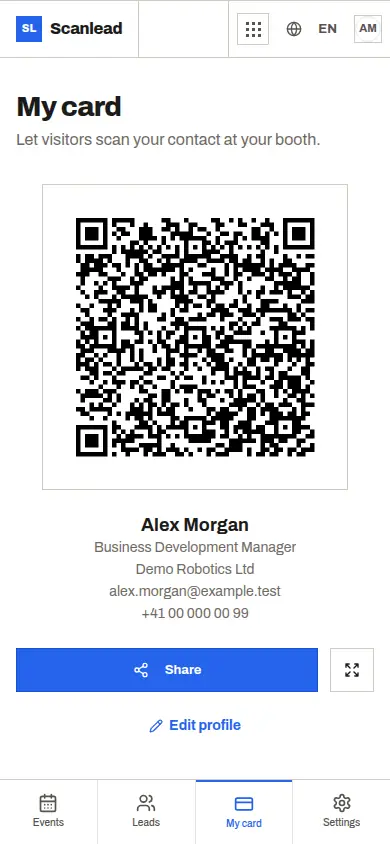
"My card" shows a QR code that holds your contact details as a vCard: name, company, job title, email and phone. ScanLead takes them from your profile, so there is nothing extra to fill in. Update your profile, and the QR code follows.
Two ways to use it on the stand:
- Full screen: show the QR code on your phone or tablet while you talk. The visitor scans it from across the table.
- Download the image: save the QR code as an image and print it on a roll-up banner, a flyer, a counter sign or the back of a paper card.
A few placement tips: print the code large enough to scan from a step away, put it at eye level rather than on the floor of a banner, and add a short line next to it such as "Scan to save our contact". On a busy stand, a printed code lets visitors save your details even while you are talking to someone else.
What the visitor sees
The visitor opens their phone's camera and points it at the code. The phone recognizes a contact card and offers to save it. Your name, company, title, email and phone go straight into their contacts.
They do not need ScanLead, an account, or any other app. That matters at a show: people are walking, holding coffee and bags, and will not download anything to keep your details.
An exchange in both directions
The QR code covers half of the exchange. The other half is getting the visitor's details into your own list. ScanLead does both from the same phone:
- You scan their badge when its QR code holds a vCard, a MeCard or a JSON contact. See Badge scanner app.
- You photograph their business card and ScanLead prefills name, company, email, title and phone. See Business card scanner for trade shows.
- They scan your "My card" QR code and leave with your contact saved.
Then mark the lead hot, warm or cold and add a note. On a three-day show, that is the difference between 120 names and a list you can actually follow up.
What "My card" does not do
We prefer to be clear about the limits. "My card" is a QR code of your contact details, and nothing more:
- no web page for your card, and no shareable card link;
- no NFC tag or NFC card;
- no Apple Wallet or Google Wallet pass.
If a web profile page or an NFC card is what you are after, tools such as Popl focus on that. We compare the two approaches in ScanLead vs Popl.
Free, for solo exhibitors and teams
"My card" is part of ScanLead, which is free with every feature included: no credit card, no subscription. Each team member has their own profile, so each one gets their own QR code.
If you work the stand alone, print your QR code once and keep your phone free for scanning. For a team, see Trade show app for sales teams. And if you need a broader overview of capture, read Free trade show lead capture app.
Not sure where to start? Ask the built-in AI Assistant "How do I show my card in full screen?" and it explains the steps and opens the right page. It can also update your profile for you: it shows a confirmation card with the before and after, and nothing changes until you confirm. Check the card first, since it can make mistakes.
ScanLead runs in your phone's browser, or as an app for iPhone, iPad and Android (see Download). Contacts you collect can go to CRMlead automatically, with the same Lead account.
Frequently asked questions
Does the visitor need an app to save my card?
No. They point their phone camera at the QR code and the phone offers to save the contact.
Which details are in the QR code?
Your name, company, job title, email and phone, taken from your ScanLead profile, in vCard format.
Can I print the QR code?
Yes. Download the image of the QR code and print it on a banner, a flyer or a paper card.
Is there an NFC version or a web page for my card?
No. "My card" is a QR code only. There is no NFC, no Wallet pass and no card web page.
Is the digital business card really free?
Yes. It is part of ScanLead, which is free with every feature included, no credit card and no subscription.