On a stand, the business card is still the most common gesture: the visitor hands it over, you slip it into a pocket, and three weeks later nobody remembers what was said. The problem is not the card, it is everything that is not written on it: the visitor's interest, their project, the promised next step.
This page explains what a business card scanner needs to do during a trade show, the pitfalls of general-purpose apps, and how Scanlead goes about it.
What a scanner needs to do on a stand
A desktop scanner reads a card. A trade show scanner needs to do three things while the visitor is still in front of you:
- Read the card: name, company, job title, email, phone number, with no retyping.
- Capture the context: what the visitor is looking for, in a short note, and their temperature (hot, warm, cold).
- File the contact in the right place: the show, the date, the team member who met them.
An app that only does the first step leaves you with one more address book. It is the second step that makes the follow-up possible.
The pitfalls of general-purpose apps
Consumer business card apps are designed for office use:
- No show: contacts land in a single list, with no record of where or when they were met.
- No qualification: impossible to tell the visitor with a project from the one who was looking for a coffee.
- Network required: in an exhibition hall, the Wi-Fi is saturated and 4G weakens. An app that needs a connection freezes at the worst moment.
- Export designed for the United States: a comma-separated CSV file opens in a single column in an Excel set up for most continental European countries.
How Scanlead goes about it
1. You photograph the card. The reading fills in the form: name, company, job title, email, phone number. The website and address go into the notes. You correct anything if needed before saving.
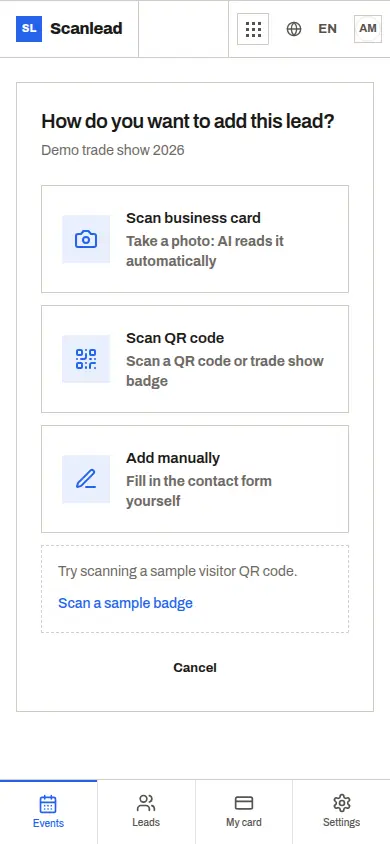
2. You qualify in one tap. Hot, warm or cold, plus a free-text note: "wants a demo in November", "comparing with their current supplier". It is this line that will make the difference at follow-up.
3. The contact is filed under its show. Each show has its own list, statistics and export. As a team (Pro+), you can see who added which contact.
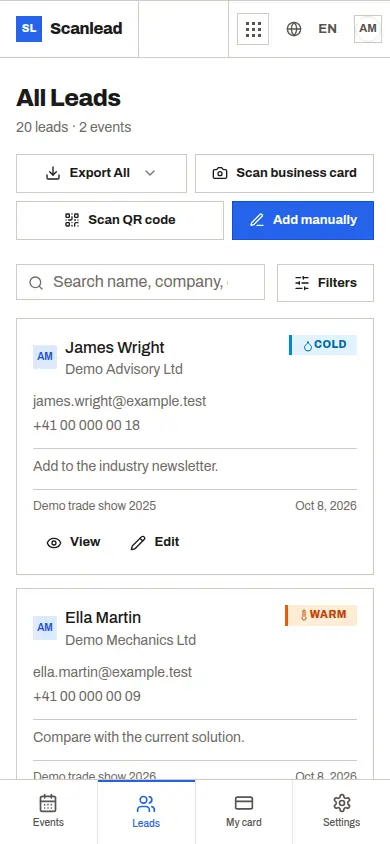
4. Without a network, the contact stays on the phone. Reading a card needs a connection; until then, scan the badge QR code or enter the contact by hand. It is kept on the phone with a clear message, then synced as soon as the network is back, without duplicates.
5. The export opens cleanly. CSV with accents preserved (comma-separated in English, semicolons in the other European languages), or Excel directly, with headers in English, including the job title and the person who added the contact. On every plan, including the free one.
What about badges?
If the visitor's badge carries a QR code containing their contact details (vCard, contact or profile address), Scanlead reads it directly. If the badge only contains a number linked to the organiser's database, no independent app can read it: you then photograph their business card or enter the contact. We say so plainly rather than promise it.
Three habits that win the follow-up
- Note the promised next step, not the product shown. "Send the offer for 3 machines before the 15th" is worth more than "interested in the X range".
- Qualify straight away. In the evening, at the hotel, you will no longer know who was hot.
- Export every evening. One file per show day lets you start following up before the stand is even dismantled.
What it costs
The free plan includes 50 captures per month, cards, badges and manual entries included, no credit card. Pro costs €19 excl. VAT per month for one user and unlimited captures; Pro+ €39 excl. VAT per month for a team of up to five. No commitment.
To compare with the organiser's badge scanner, published prices included: Alternative to the organiser's badge scanner.
Frequently asked questions
Do I need to install an app? No: Scanlead runs in the phone's browser (Safari, Chrome). An Android app is also available on Google Play.
And after the show? How to get the contacts into your CRM and follow them up is covered in Trade show leads to your CRM.