"Lead retrieval" is the term show organizers use in their exhibitor manuals. It covers everything that lets you collect the details of the people who visit your stand, from the scanner you rent for three days at a single show to the app that sits on your own phone all year and goes with you from one exhibition centre to the next.
If you have just read that phrase in a manual and wonder what you are supposed to order, this page is for you. It explains the two ways lead retrieval works at a show, what to check before you choose, and how ScanLead handles the job without any order to place.
Two kinds of lead retrieval
The first kind is the organizer's service. The show works with a provider, such as Scan2Lead or LeadSuccess at many German and Swiss shows, and sells you a licence for that show. The app or device connects to the registration database, so it can read every badge, even those that only hold a number. You order it in advance, often before a deadline, and the leads stay on the platform for a limited time after the show.
The second kind is an independent lead retrieval app that you choose yourself and use at every show. It reads what is actually printed in the badge code, plus business cards and manual entries. It does not depend on one organizer, and the leads stay in your own account. ScanLead belongs to this family, and the two approaches are compared in detail in Alternative to the organizer's badge scanner.
Questions to ask before the show
Ask early. A short email to the organizer answers most of them. The first is what the badges contain. If the QR code holds a vCard or another contact format, any decent app reads it. If it only holds an ID, you need the organizer's service or you fall back on business cards.
The second question is how long the leads stay available, and in which format you can download them. Then there is the team. The third question is whether each licence covers one device or one person, because a stand of four people quickly means four licences per show. With an independent app, these questions disappear, since the whole team uses the same free account.
How ScanLead does lead retrieval
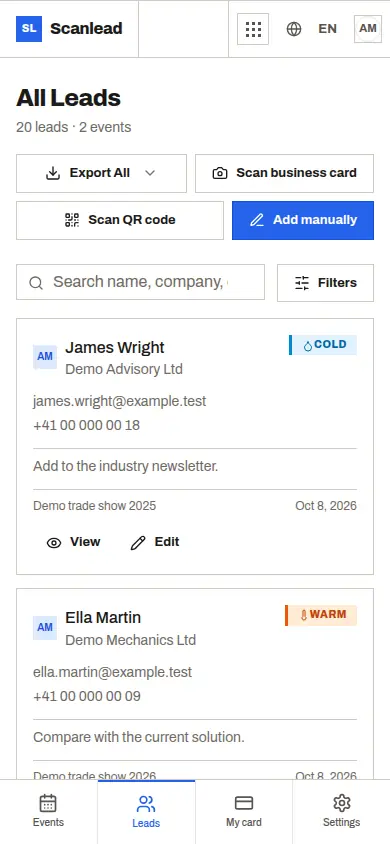
Setup is short. You create the event once, with its name, dates, city, venue and stand. During the show, each person on the stand adds contacts from their own phone, by scanning the badge QR code, photographing the business card or typing the details. Every lead gets a hot, warm or cold status and a note on the next step, and the list is shared by the whole team in real time.
Invite colleagues by email from Settings, Team, and they join the same workspace. Roles are Owner, Admin and Member, and the export shows who added each contact. The method for a group is described in Trade show app for sales teams.
After the show
This is where it pays off. Your leads do not disappear when the organizer's portal closes. You export a CSV or Excel file per show, or all leads at once, and you can come back to them months later to compare shows and see which one brought the largest share of hot leads.
If you follow up from a CRM, CRMlead receives the contacts automatically with the same Lead account. For HubSpot, Salesforce or another tool, import the file or connect through Make or Zapier with the REST API and webhooks. Our guide Trade show leads to your CRM walks through the 3 options.
What it costs
ScanLead is free, with every feature included, no credit card and no limit on leads or team members. A built-in AI Assistant is included too. Ask it "How many hot leads did I get at my last show?" and it answers, or ask it to change a status and it shows a confirmation card before anything is applied. If you are still comparing tools, our lead scanner app page covers the scanning side in more depth.
Frequently asked questions
What is lead retrieval at a trade show?
It is the way exhibitors collect visitor details at their stand, either with the organizer's licensed service or with an independent app on their own phone.
Do I have to use the organizer's lead retrieval service?
No. It is optional. It is the only way to read badges that hold just an ID number, but an independent app like ScanLead reads QR badges with contact data, business cards and manual entries.
How many people can use ScanLead at one stand?
As many as you need. Team members are unlimited, and each one scans with their own phone.
How long do my leads stay in ScanLead?
They stay in your account after the show, until you delete them. You can export them to CSV or Excel at any time.
Is ScanLead really free?
Yes. Every feature is included for each workspace, with no credit card, no subscription and no monthly cap on cards, badges or team members.