Cvent iCapture is a serious tool, built for sales and marketing teams who exhibit at many shows and want every lead pushed into Salesforce or Marketo with a standard questionnaire. If you are reading about an iCapture alternative, your situation is probably a little different.
Maybe you do three or four shows a year and an annual contract feels heavy. Maybe your team would rather work in French, German, Italian or Spanish. Or you simply want to try something today without booking a demo first. This page sorts the alternatives into families, says honestly what each one is good at, and shows where ScanLead fits among them.
What iCapture does well
Let us start there. It is worth being clear about this before looking elsewhere. iCapture connects to more than 130 badge service providers, including Scan2Lead and Swapcard, and it can read encrypted badges (source). The app also reads NFC badges at shows that use them (source), and it offers conditional questions with a "HOT LEAD" flag (source).
On the CRM side, iCapture sends leads natively to Salesforce, HubSpot, Microsoft Dynamics, Marketo, Pardot and others (source). If your company already works inside Cvent and runs a large programme of shows, those features are hard to replace, and you may not need an alternative at all.
The 4 families of alternatives
Exhibitors who leave iCapture, or never sign up, usually end up with one of these approaches. They are not exclusive. Many teams combine two.
- The organizer's badge scanner. Many German and Swiss shows rent a scanner per show, such as Scan2Lead or LeadSuccess. It reads every badge from the registration database, which a phone app cannot do. We compare it in Alternative to the organizer's badge scanner.
- Another dedicated lead capture app. snapADDY, KAYO and Popl each take a different angle on the same job. Read snapADDY alternative, KAYO alternative and ScanLead vs Popl for the details.
- A business card scanner. Apps like CamCard are good at contacts in general, less at sorting them by show. See CamCard alternative.
- A free trade show app such as ScanLead. You capture with your own phone, qualify on the spot and export at the end, with nothing to pay and no contract to sign.
Where ScanLead fits
ScanLead was built for the stand, and for exhibitors who want to start on their own. You open it in your phone's browser, or in the iPhone or Android app, create the event with its dates, city, venue and stand, and start adding contacts. There is no adviser to schedule and no setup per form. That is all.
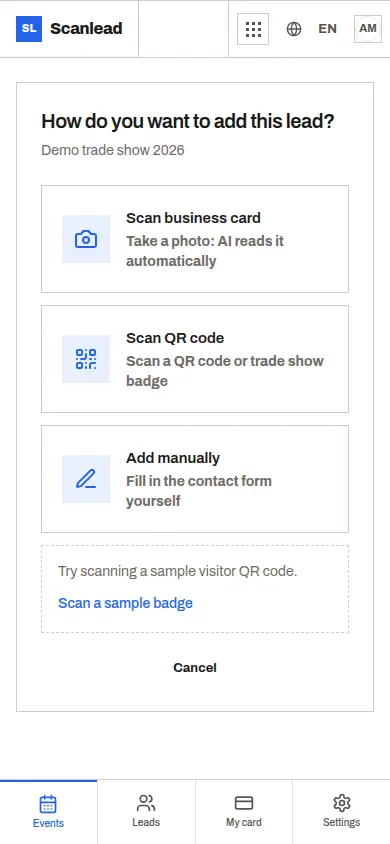
Each contact comes in one of 3 ways. You can photograph the business card, which ScanLead reads and turns into name, company, job title, email and phone for you to check, or scan a badge QR code that holds a vCard, a MeCard or a JSON contact. When the visitor has neither, you type the contact in by hand. Then you mark the lead hot, warm or cold and write a note while the conversation is still fresh.
After the show you export a CSV or Excel file per event, or let CRMlead receive the contacts automatically with the same Lead account. For other tools, the REST API and signed webhooks work with Make or Zapier.
What you give up, and what you gain
Some things are missing. Being honest here saves you a bad surprise on the first morning of a show, when the first visitors are already at the stand and there is no time left to change tools. ScanLead does not read badges that only hold a number from the organizer's database, it has no NFC, no customizable questionnaire, and no native Salesforce or HubSpot integration. If those points are central to your shows, iCapture or the organizer's scanner will serve you better.
What you gain is a tool that is free, with every feature included, no credit card and no annual contract. There is no limit on captures or on team members, and the interface is available in English, French, German, Italian and Spanish at no extra cost. A built-in AI Assistant answers questions like "How many hot leads did I get at my last show?" and can prepare changes, which it shows on a confirmation card before anything is applied.
Switching from iCapture
At iCapture, leads are downloaded as a CSV or Excel file after each show (source). Keep them. You can then run your next show in ScanLead and compare the two exports side by side before deciding which tool you keep for the following season.
If you want the full criterion-by-criterion table, with pricing model, commitment, languages, badges, offline use and CRM links, read ScanLead vs Cvent iCapture. It is the detailed version of this page.
Frequently asked questions
What is the best iCapture alternative?
It depends on your shows. If badges only carry a number, the organizer's scanner is the only way to read them. If you mostly get business cards and QR badges and want a free tool, ScanLead fits well.
Is ScanLead free?
Yes. Every feature is included, with no credit card, no subscription and no limit on captures or team members.
Can ScanLead read the same badges as iCapture?
Not all of them. ScanLead reads badge QR codes that contain a vCard, a MeCard, a JSON contact or a LinkedIn profile link. Encrypted or number-only badges need the organizer's reader.
Does ScanLead connect to Salesforce or HubSpot?
Not natively. You export a CSV or Excel file, or connect through Make or Zapier with the API and webhooks. CRMlead receives the contacts automatically.
Can I keep my iCapture leads?
Yes. Download them from iCapture as CSV or Excel after each show and keep the files. ScanLead starts with your next event.