Many exhibitors still use a paper sheet, or a Word or Excel template, to note who stopped by the stand. It works until the third day, when the clipboard is full, the handwriting is rushed, and nobody remembers what "call re: price" meant.
This page gives you a trade show lead form template you can use with or without any tool, then shows how ScanLead fills the same fields from a phone.
Why paper and spreadsheet forms let leads slip
- Retyping: every paper form has to be typed into a file after the show, often days later.
- Unreadable notes: what was obvious at 4 p.m. on day two is a mystery a week later.
- One copy: the sheets sit with one person, and the rest of the team cannot see them.
- No sorting: without a clear priority field, hot leads get the same slow follow-up as the rest.
A lead form template you can reuse
Keep the form short. Each field should help you follow up, not just fill a box. Here is a template you can copy into a sheet, a printed form or any tool:
| Field | Why it matters | Example |
|---|---|---|
| Name | Who you will write to | Alex Morgan |
| Company | Who you are selling to | Northside Fabrication |
| Job title | Is this the decision-maker? | Purchasing manager |
| Main follow-up channel | a.morgan@example.com | |
| Phone | For hot leads, call first | +1 555 0100 |
| Status | Priority of the follow-up | Hot / warm / cold |
| Notes | What was said and promised | Wants a quote for 40 units before March |
| Added by | Who to ask for context | The colleague who had the conversation |
| Event | Where you met | Name of the show |
| Date added | When you met, and how long ago | Day two of the show |
Two tips: write the next step in the notes ("send the catalog", "demo in January"), and set the status before the visitor leaves the stand, not at the hotel.
How ScanLead fills the form for you
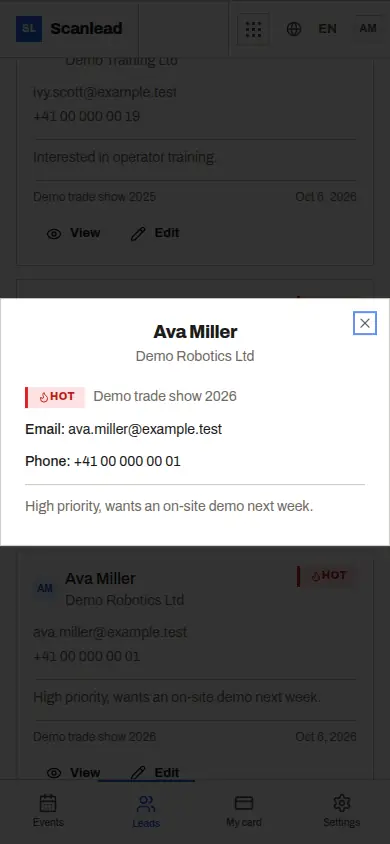
ScanLead uses the same fields, and fills most of them without typing:
- Name, company, job title, email, phone: read from a business card photo, or from a badge QR code holding a vCard, MeCard or JSON contact. Check the result, then save. See Business card scanner for trade shows and Badge scanner app.
- Status and notes: two taps for hot, warm or cold, and a free note.
- Added by: filled automatically with the team member who captured the lead.
- Event and date added: every lead is attached to the show you are working, with its dates, city, venue and stand.
- Manual entry: when the visitor has no card and no readable badge, type a few fields in.
Records can be edited later, and every change is time-stamped. Badge scanning and manual entry keep working if the hall network drops, as long as ScanLead was open before; reading a card photo needs a connection.
From the form to an Excel file
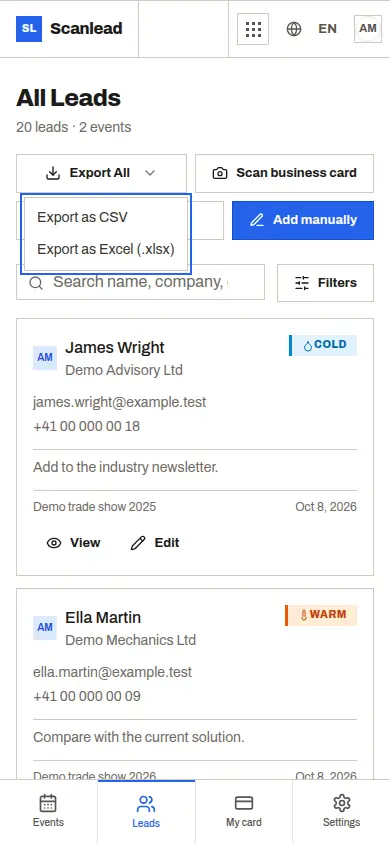
At the end of the show, export to CSV or Excel (.xlsx), for one show or for all your leads. The file has the columns from the template above: name, company, email, phone, status, notes, job title, added by, event name and date added. You choose the language of the file.
Sort by status and start with the hot leads. To get the file into HubSpot or Salesforce, import it or use Make or Zapier with the ScanLead API. CRMlead receives the contacts automatically, with the same Lead account. More in Trade show leads to your CRM.
Free, for one person or the whole stand
ScanLead is free with every feature included: no credit card, no subscription, no limit on contacts or team members. A freelancer at one regional show and a team of five at a three-day international fair use the same form.
The built-in AI Assistant can help too. Ask "Add a note to my last lead: send the catalog on Monday" and it prepares the change, shows a confirmation card with the before and after, and applies it only when you click Confirm. It can make mistakes, so read the card first. For more on solo stands, see Lead capture for small exhibitors.
Frequently asked questions
What fields should a trade show lead form have?
Name, company, job title, email, phone, a status (hot, warm, cold), notes on the next step, who captured the lead, the event and the date.
Can I still use a paper form?
Yes, the template above works on paper. The cost is retyping everything after the show, and notes that are harder to read a week later.
Can I add my own custom questions in ScanLead?
ScanLead uses a fixed set of fields: contact details, hot, warm or cold status, and free notes. Put any extra answers in the notes.
Can I get the leads in Excel?
Yes. Export to CSV or Excel (.xlsx), per show or for all leads, in the file language you choose.