The show is over. You met 120 people in three days, and your inbox is already filling up with everything you missed. The contacts you captured are only worth something if you write to them while they still remember your stand.
This page covers when to send your trade show follow up email, how to match it to each lead, and three short templates you can copy.
When to send it
- Hot leads: within one or two working days. They asked for a quote, a demo or a call. Every day you wait, a competitor from the next aisle may answer first.
- Warm leads: within the first week. They showed interest but no urgency. A short, useful message is enough.
- Cold leads: within two weeks, or not at all. A light note with a resource, and no pressure.
Block time for this before the show. On a three-day event, the first morning back is often the best moment for the hot leads.
One email per temperature
Sending the same message to everyone is easy and rarely works. The status you set on the stand (hot, warm or cold) tells you which email to send, and the note tells you what to say.
- Mention the conversation. "You asked about delivery times for the 40-unit order" beats "Thanks for visiting our stand".
- Give one next step. A call slot, a quote, a document. Not three.
- Keep it short. Five to eight lines. People read these on their phone between meetings.
Three templates to copy
Hot lead
Subject: Your quote for [product], as discussed at [show]. Hi [first name], thanks for the conversation at our stand on [day]. As promised, here is the quote for [quantity] [product], with delivery by [date]. I have kept two slots for a quick call to go over it: [day, time] or [day, time]. Which one works for you? Best regards, [your name]
Warm lead
Subject: Following up on [topic] from [show]. Hi [first name], it was good to meet you at [show]. You mentioned [need or project]. Here is [a short case study / the product sheet] that covers exactly that. If it is useful, I am happy to set up a 20-minute call in the coming weeks. Best regards, [your name]
Cold lead
Subject: Nice meeting you at [show]. Hi [first name], thanks for stopping by our stand at [show]. In case it helps later, here is our [catalog / website link]. If [topic] comes up on your side, just reply to this email. Best regards, [your name]
Replace every bracket, and add one detail from your notes. That one line is what makes the email feel written for them.
How ScanLead prepares the follow-up
ScanLead does not send emails. It gets your list ready so that you can write them quickly, from your own mailbox or your CRM.
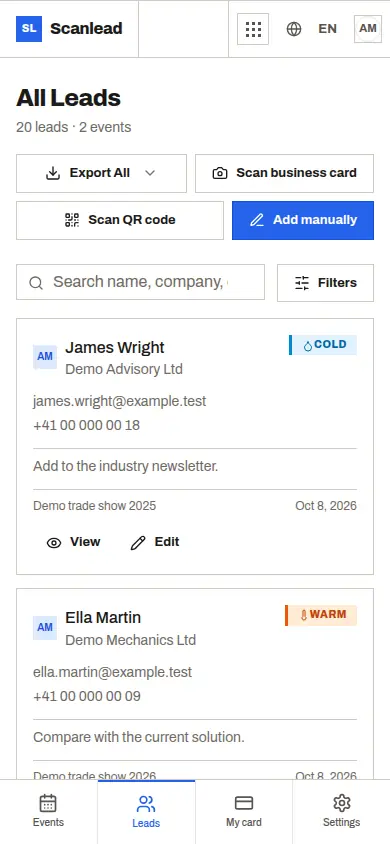
- Statuses set on the stand: each lead is already hot, warm or cold, so you know which template to use.
- Notes: what the visitor asked for and what you promised, written while the conversation was fresh.
- Export: CSV or Excel, per show, with name, company, email, phone, status, notes, job title, added by, event name and date added. Sort by status, start with the hot leads.
- CRMlead: CRMlead receives your contacts automatically, with the same Lead account, so you can track each follow-up there.
Ask the built-in AI Assistant "How many hot leads did I get at my last show?" to see the size of your first batch. It can also change a status or add a note once a lead replies; it shows a confirmation card with the before and after, and nothing changes until you click Confirm. Check the card, since it can make mistakes.
If you use HubSpot or Salesforce, import the export file or connect the ScanLead API through Make or Zapier. More in Trade show leads to your CRM.
For solo exhibitors and small teams
Alone on the stand, the follow-up is often the first thing to slip. Capturing a status and a note per lead takes seconds, and saves an afternoon of guessing later. See Lead capture for small exhibitors.
In a team, the "added by" column tells you who had the conversation, so the right person writes the email. See Trade show app for sales teams. ScanLead is free, with no credit card and no subscription, for one person or the whole stand. To set it up before your next event, start with Free trade show lead capture app.
Frequently asked questions
How soon should I send a trade show follow up email?
Hot leads within one or two working days, warm leads within the first week, cold leads within two weeks.
Should every contact get the same email?
No. Match the email to the lead: a concrete next step for hot leads, a useful resource for warm ones, a light note for cold ones.
Does ScanLead send the follow-up emails?
No. ScanLead prepares the list with statuses, notes and an export. You send the emails from your own mailbox or CRM.
How many follow-up emails should I send?
Start with one well-written email per lead. If a hot lead does not answer, a phone call is often better than a second email.
How do I get my leads into my CRM before writing?
Export to CSV or Excel and import the file, use the API with Make or Zapier, or let CRMlead receive the contacts automatically.