You have a stand booked, a stack of brochures, and three days of conversations ahead. What you do not have is a budget line for a lead scanner rental or an annual software license.
This page explains what a free trade show lead capture app should do, what ScanLead does at no cost, and where its limits are, so you can decide before the show and not on the morning it opens.
What a lead capture app has to do on the show floor
A conversation at a stand lasts a few minutes. The app has to keep up. Four things matter:
- Fast capture: a business card photo, a badge QR code, or a short manual entry when the visitor has neither.
- Qualification on the spot: is this a hot lead, a warm one, or just a brochure collector? Plus a note on what you promised.
- Working when the hall Wi-Fi gives up: exhibition centers are crowded, and networks drop.
- A clean file at the end: something you can open in Excel, send to your CRM, or use to write follow-up emails.
An app that captures well but cannot export, or exports well but stalls without a network, will cost you leads.
How ScanLead captures and qualifies leads
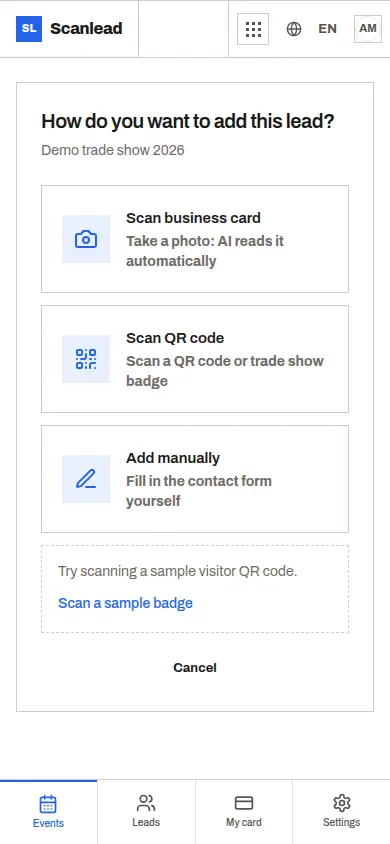
ScanLead gives you three ways to add a contact. Photograph a business card and the app reads it: name, company, email, job title and phone are filled in for you to check. It reads Latin, Greek, Cyrillic, Chinese, Japanese and Korean scripts. For card tips, see our business card scanner guide.
Scan the badge QR code when it contains a vCard, a MeCard or a JSON contact; ScanLead also picks up the name from a LinkedIn profile link. More on this in Badge scanner app. Or type it in: a few fields, a status and a note.
Then mark the lead hot, warm or cold and add a note, for example "wants a quote for 40 units before March". Every lead belongs to an event, with its dates, city, venue and stand number, so a three-day show with 120 contacts stays separate from the next one.
What is included without paying
ScanLead is free, with every feature included for each workspace. No credit card, no subscription, no commitment, and no monthly limit on cards, badges or team members.
- Business card reading, badge QR scanning and manual entry.
- Hot, warm and cold status, notes, and time-stamped edits.
- Statistics per show, and a comparison of your shows to see which one brought the largest share of hot leads.
- CSV and Excel export, per show or for all leads, with the file language of your choice.
- Unlimited team members with Owner, Admin and Member roles.
- REST API with API keys and signed webhooks, documented on the developers page.
- The built-in AI Assistant.
Use it in your phone's browser with nothing to install, or get the iPhone, iPad and Android apps from the download page. It is the same account everywhere.
The AI Assistant, in plain terms
Open the "AI Assistant" bubble and write what you want. Ask "How many hot leads did I get at my last show?" or "How do I export my leads to Excel?" and it answers, then opens the right page.
It also prepares actions: create an event, add or edit a lead, add a note, change a status. Before anything changes, it shows a confirmation card with the before and after. Confirm applies it, Cancel leaves everything as it was. It can make mistakes, so check the card before you confirm. The Assistant is part of the free version, with a monthly allowance of requests.
Honest limits
- Number-only badges: some shows print a badge that only holds an ID number, readable only by the organizer's scanner. Photograph the visitor's business card or type the contact in. Our organizer badge scanner comparison covers the trade-offs.
- Card reading needs a connection: open ScanLead while you have a network. If it drops later, badge QR scanning and manual entry keep working, the contact stays on the phone and syncs when the network returns. Card photos are read once you are online, and must be under 10 MB.
- No native HubSpot or Salesforce integration: export a file, or connect through Make or Zapier with the API.
For solo exhibitors and small teams
If you staff your stand alone, ScanLead keeps your contacts sorted by show without a monthly bill in the quiet months. Read more in Lead capture for small exhibitors.
If you are three or four on the stand, invite each person by email from Settings > Team. Everyone scans with their own phone and sees the team's leads, and the export shows who added each contact. See Trade show app for sales teams.
After the show, CRMlead receives your contacts automatically with the same Lead account, if you want a place to track the follow-up.
Frequently asked questions
Is ScanLead really free?
Yes. Every feature is included for each workspace, with no credit card, no subscription and no monthly cap on cards, badges or members.
Do I need to install an app?
No. ScanLead runs in your phone's browser (Safari on iOS 15+, Chrome, Brave, Edge, Firefox 100+). Apps for iPhone, iPad and Android are also available.
Does it work without internet at the show?
Open ScanLead while you have a network. If the connection drops after that, badge QR scanning and manual entry keep working and sync later. Reading a business card photo needs a connection.
Can I get my leads into Excel or my CRM?
Yes. Export to CSV or Excel per show or for all leads. For HubSpot or Salesforce, import the file or use Make or Zapier with the API. CRMlead receives contacts automatically.
Where is my data stored?
In a Postgres database at Neon in the Europe (Frankfurt) region, with an encrypted daily backup kept for 30 days. Your contacts, notes and card photos are never used to train an AI model.