CamCard is a well-known name for scanning business cards. If you are looking at a CamCard alternative, it is often because your use is specific: you meet most of your prospects at trade shows, and you want those contacts sorted by show, qualified, and ready for follow-up.
This page compares the two tools on what each one publishes. For CamCard, we only use what the vendor states on its own site (camcard.com, checked on 4 November 2026). Where something is not stated, we say so.
What CamCard offers
CamCard presents itself as a digital business card and card scanning solution for teams and professionals. According to its site, it offers:
- scanning of paper business cards, QR codes and email signatures;
- customized digital business cards;
- sync with Salesforce, Google Contacts, Outlook and the phone's address book;
- a plan for teams.
It is a broad contact tool, useful wherever you meet people: meetings, events, email exchanges.
What ScanLead is built for
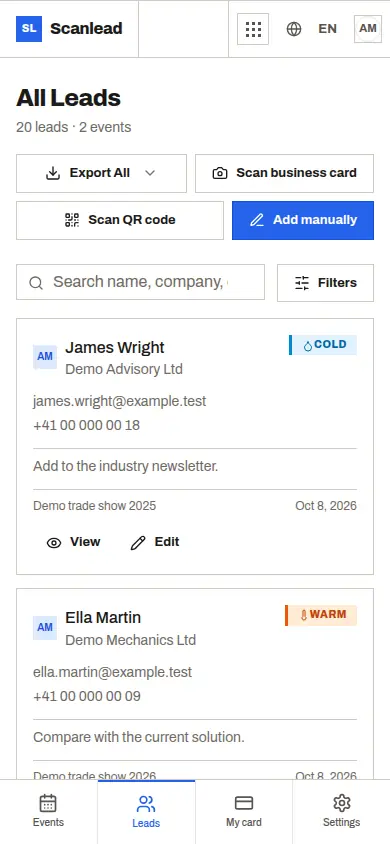
ScanLead has a narrower focus: the trade show stand. Every lead belongs to an event, with its name, dates, city, venue and stand. You mark each contact hot, warm or cold, add a note, and see statistics per show.
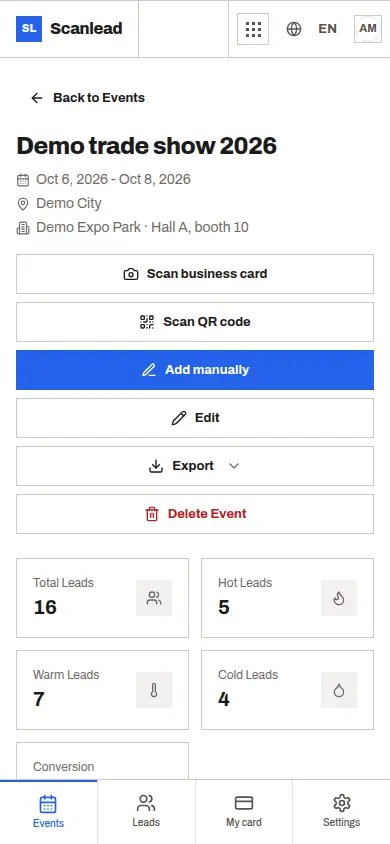
After three shows in a year, you can compare them and see which one brought the largest share of hot leads. That is the question most exhibitors ask before booking next year's stand.
Side by side
| Criterion | CamCard (per camcard.com) | ScanLead |
|---|---|---|
| Business card scanning | Yes | Yes, photo read automatically (Latin, Greek, Cyrillic, Chinese, Japanese, Korean scripts) |
| QR code scanning | Yes | Badge QR codes with a vCard, MeCard or JSON contact; name from a LinkedIn profile link |
| Email signature scanning | Yes | No |
| Your own digital card | Customized digital business cards | "My card": a vCard QR code of your details, full screen or downloadable image |
| Contacts sorted by trade show | Not stated | Yes, every lead belongs to an event |
| Hot, warm, cold status | Not stated | Yes, plus notes |
| Statistics per show | Not stated | Yes, with comparison between shows |
| Offline capture | Not stated | Badge QR and manual entry: yes, synced later. Card reading: connection needed |
| CRM and contacts | Sync with Salesforce, Google Contacts, Outlook, address book | CSV and Excel export, REST API and webhooks (Make, Zapier), CRMlead automatically |
| Teams | Team plan | Unlimited members, Owner, Admin and Member roles |
| Price | Not covered here | Free, every feature included, no credit card |
What ScanLead adds for exhibitors
- Badge QR scanning on the stand. Many visitor badges carry a vCard or MeCard QR code; ScanLead reads it in a second. See Badge scanner app. Number-only badges need the organizer's reader, covered in Alternative to the organizer's badge scanner.
- Qualification while the visitor is still there. Hot, warm or cold, and a note on the next step.
- Working through network drops. Open ScanLead with a connection; if it drops, badge scanning and manual entry keep working and sync later.
- Exports built for follow-up. CSV or Excel per show, with status, notes, "added by", event name and date added.
- A built-in AI Assistant. Ask "How many hot leads did I get at my last show?" and it answers. It can also prepare changes, such as creating an event or changing a status, and shows a confirmation card before anything is applied. It can make mistakes, so check the card.
- Free for the whole team. No subscription, no limit on members or captures, which suits freelancers and small teams who exhibit a few times a year.
When to choose CamCard, when to choose ScanLead
CamCard fits if you collect contacts everywhere, not mainly at trade shows, if you want to scan email signatures, or if you need contacts synced with Salesforce, Google Contacts or Outlook as CamCard describes.
ScanLead fits if trade shows are where you meet prospects, if you want each contact tied to a show and rated hot, warm or cold, and if you want to compare your shows. It is free, so you can test it on your next event without a purchase decision.
Some exhibitors use both: a general contact app for daily networking, and ScanLead on the stand. For a broader comparison, see Free trade show lead capture app and our business card scanner guide. To follow up afterwards, ScanLead sends contacts to CRMlead with the same Lead account, or read Trade show leads to your CRM.
Frequently asked questions
Is ScanLead a full replacement for CamCard?
It depends on your use. ScanLead is built for trade show leads: capture, qualification, statistics per show and export. It does not scan email signatures.
Does ScanLead sync with Salesforce?
Not natively. You can import the CSV or Excel export, or connect the ScanLead API to Salesforce through Make or Zapier.
Can I move my existing contacts into ScanLead?
Contacts enter ScanLead by capture, manual entry or the API. A simple approach is to keep your current file for past contacts and start your next show in ScanLead.
Is ScanLead free?
Yes. Every feature is included for each workspace, with no credit card, no subscription and no limit on team members.